

Ever wondered when to reach for MCP vs. building an Agent Skill? Both let you supercharge your AI agents, but they solve very different problems — and picking the wrong one can leave you tangled in unnecessary complexity (or stuck reinventing the wheel).
Let’s break it down with the 5 key dimensions that matter, so you can stop guessing and start building smarter.
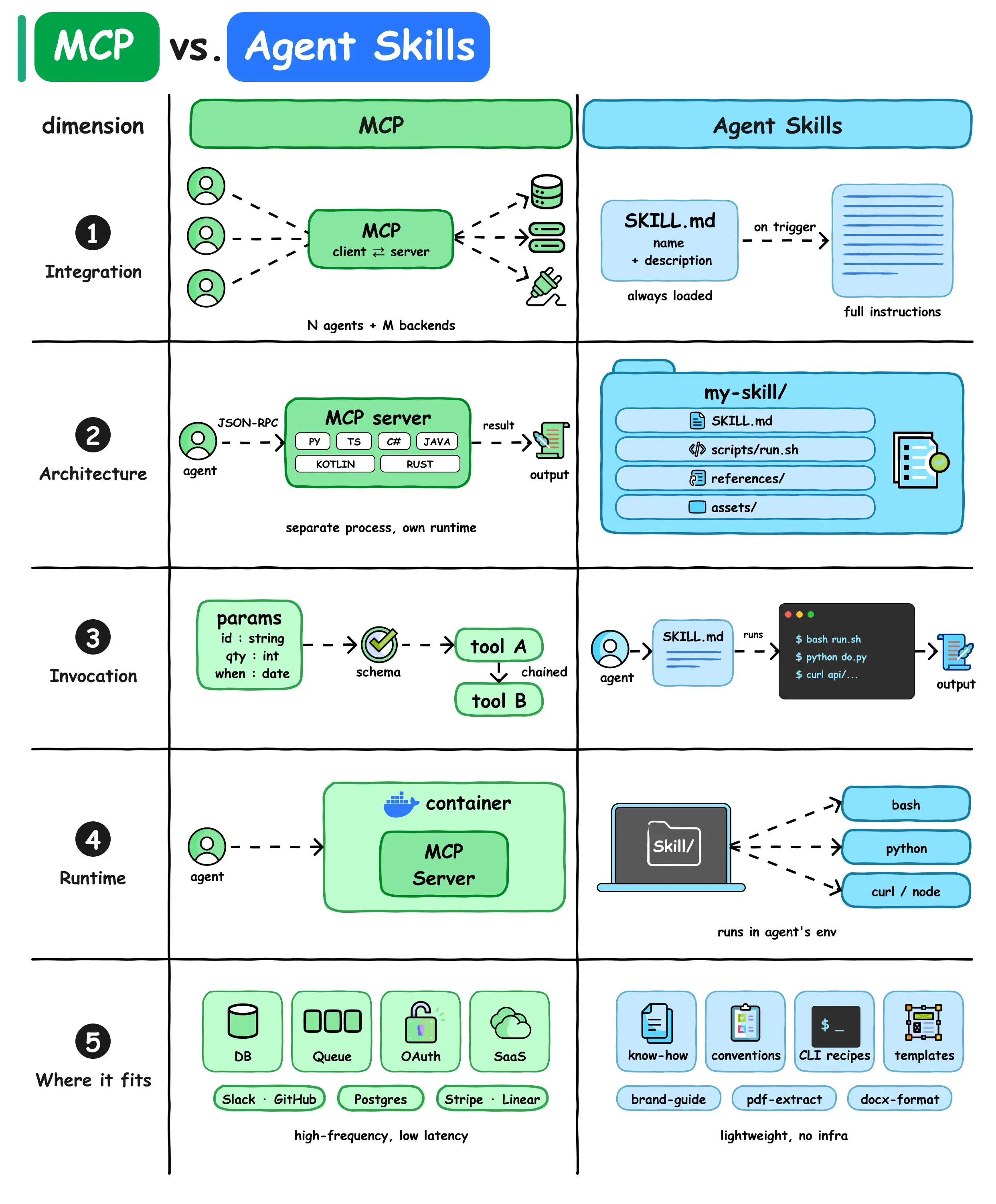
1. Integration: “One Hub to Rule Them All” vs. “Trigger-and-Go”
🔌 MCP
Think of MCP as a universal power strip for your AI agents. It’s a client-server protocol that lets N agents talk to M backends (databases, APIs, queues) through a single, standardized interface. No more building custom connectors for every tool you use — just plug into the MCP server once, and every agent can access everything.
Perfect for teams with multiple agents that need to tap into shared systems.
📂 Agent Skills
Skills are lightweight, self-contained “superpowers” your agent loads on demand. At their core, they’re just a folder with a SKILL.md file (think: a detailed instruction manual). When triggered, the agent reads the file and follows the steps — no complex setup required.
Great for one-off workflows you want to package and reuse, without extra infrastructure.
2. Architecture: “Separate Service” vs. “Directory of Goodies”
🛠️ MCP
MCP runs as a separate process with its own runtime, speaking the language of JSON-RPC. It’s built to handle scale, supporting multiple languages (Python, TypeScript, C#, Java, Kotlin, Rust) out of the box.
This is enterprise-grade architecture: isolated, secure, and designed to keep your backend logic separate from your agents.
📁 Agent Skills
A Skill is just a directory — that’s it. It might include:
- SKILL.md (the agent’s playbook)
- Scripts (bash, Python, whatever you need)
- References (docs, data, templates)
- Assets (images, configs, examples)
No servers, no containers, no extra runtimes. Just files your agent reads and executes directly.
3. Invocation: “Typed & Chained” vs. “Read & Run”
⚙️ MCP
When you call an MCP tool, you send typed parameters validated against a schema (e.g., id: string, qty: int, when: date). The system checks everything before the tool runs, so you avoid messy errors. Even better: tools can be chained, so one call triggers a sequence of actions automatically.
This is how you build reliable, production-grade workflows.
📜 Agent Skills
Skills are invoked when the agent reads the SKILL.md file and executes whatever commands it describes. That could be:
- Bash scripts
- Python code
- Curl API calls
- Or even just plain-text instructions
It’s flexible, but there’s no built-in schema validation — you’re relying on the agent to follow the rules correctly.
4. Runtime: “Containerized” vs. “Agent’s Backyard”
🐳 MCP
MCP servers typically run in their own containers or dedicated services. This isolation keeps your backend systems safe and scalable, even when multiple agents are hitting the server at once.
Ideal for production environments where stability and security are non-negotiable.
💻 Agent Skills
Skills run directly in the agent’s own environment. No extra infrastructure, no containers, no separate services. They’re lightweight and fast to spin up — perfect for prototyping, internal tools, or workflows that don’t need heavy lifting.
5. Where They Fit: “Live Systems” vs. “Know-How”
🎯 MCP
Use MCP when you need to connect agents to live systems and data:
- Databases (Postgres)
- SaaS tools (Slack, GitHub, Stripe, Linear)
- Queues, OAuth services, or other low-latency/high-frequency tools
It’s the best choice for production-grade integrations that need reliability and scale.
🎯 Agent Skills
Use Skills when you want to give agents reusable know-how and instructions:
- Brand style guides
- CLI recipes
- Document extraction/formatting templates
- Common conventions or best practices
They’re lightweight, require zero infrastructure, and let you codify institutional knowledge your team uses every day.
Quick Cheat Sheet: Which One to Pick?
| Scenario | Choose MCP | Choose Agent Skills |
|---|---|---|
| Connecting to databases/APIs | ✅ | ❌ |
| Packaging reusable workflows | ❌ | ✅ |
| Multiple agents sharing tools | ✅ | ❌ |
| Fast prototyping or internal tools | ❌ | ✅ |
| Production-grade, low-latency access | ✅ | ❌ |
| Codifying team conventions/templates | ❌ | ✅ |
At the end of the day, these aren’t competitors — they’re complementary tools. MCP is your agent’s secure, scalable backend connector, and Skills are its quick, customizable playbooks. Use them together, and you’ve got an AI setup that’s both powerful and flexible.
