

We’re thrilled to announce the launch of our official MCP Server on the Python Package Index (PyPI), putting ALGOGENE’s industry-leading quant trading functionality directly into the hands of developers, quants, and trading teams worldwide. Whether you’re building algorithmic trading strategies, conducting real-time financial analytics, managing portfolios, or optimizing risk analysis, the ALGOGENE MCP Server is the standardized, scalable bridge between your code and ALGOGENE’s global quant trading ecosystem.
In this post, we’ll break down what MCP is, the game-changing advantages of the ALGOGENE MCP Server, and a step-by-step guide to installing and using this powerful tool to supercharge your quant trading workflow.

What is the Model Context Protocol (MCP)?
At its core, the Model Context Protocol (MCP) is an open, standardized communication protocol that acts as the USB-C for AI and financial applications—it creates a universal bridge between applications, AI models, and external data sources/tools, eliminating the need for custom, one-off integrations. Built on the robust JSON-RPC 2.0 framework, MCP enables stateful, bidirectional communication between three core components:
- Host: Your local/ cloud-based quant trading application (e.g., Python scripts, Jupyter Notebooks, custom trading platforms).
- Client: The connector within your host application that initiates requests to the MCP Server.
- Server: The ALGOGENE MCP Server, which exposes our full suite of quant trading capabilities as standardized, callable functions.
For quant traders and financial developers, MCP solves a critical pain point: fragmented integration. Before MCP, building a quant trading workflow meant writing custom API calls for every data source, trading tool, or analytics feature, wasting hours on repetitive code and limiting scalability. With MCP, you use a single, consistent protocol to access all of ALGOGENE’s functionality, from real-time market data to portfolio optimization and order management. MCP doesn’t replace APIs, it standardizes and streamlines how you interact with them, making your code more maintainable, portable, and future-proof.
ALGOGENE’s MCP implementation is purpose-built for financial markets, with native support for the high-throughput, low-latency demands of quant trading. It leverages MCP’s core design principles: context awareness, secure access, and composable workflows—to ensure your trading models and applications have real-time access to the exact data and tools they need, when they need it.
Key Advantages of the ALGOGENE MCP Server
The ALGOGENE MCP Server isn’t just a PyPI package, it’s a gateway to ALGOGENE’s entire quant trading ecosystem, with features designed to accelerate every stage of the trading lifecycle (strategy research → backtesting → live trading → portfolio management). Here are the standout benefits that set it apart:
1. Full Access to ALGOGENE’s Industry-Leading Functionality
The MCP Server exposes all of ALGOGENE’s core and premium features as standardized MCP functions, covering every critical quant trading use case:
- Contract Specification: Fetch instrument metadata, search financial assets, list economic time series, etc.
- Real-Time Financial Analytics: Live prices, 24hr market changes, exchange rates, real-time news, economic calendars, etc
- Historical Data: Market prices, corporate announcements, historical economic stats, etc.
- Trading Account Management: Real-time balance/position tracking, session authentication, and broker/exchange connection setup, etc
- Order Placement & Execution: Place, update, cancel, and close orders with precision.
- Premium Marketplace Apps: Seamlessly call ALGOGENE’s community-built trading tools
No more switching between multiple APIs or platforms, everything you need is one MCP call away.
2. PyPI Native: Simple Installation, Python-First Workflow
As a PyPI package, the ALGOGENE MCP Server integrates seamlessly with the Python quant trading stack. Install it in one line, import it into your existing scripts/notebooks, and start building, no complex infrastructure setup required.
Visit our project page at https://pypi.org/project/algogene-mcp-server/
3. Composable Workflows: Build Custom Quant Trading Pipelines
MCP’s composable design lets you chain ALGOGENE’s MCP functions to build custom, end-to-end trading pipelines—no vendor lock-in. For example:
- Fetch real-time HKEx-SSE Stock Connect capital flow data (app_capitalflow_hkex_sse).
- Analyze market sentiment with app_predict_sentiment using real-time news (get_realtime_news).
- Optimize your portfolio based on the data with app_portfolio_optimizer_custom.
- Place live orders based on your optimized strategy (open_order).
Every step uses standardized MCP calls, making your pipeline easy to modify, test, and scale.
4. Seamless Integration with ALGOGENE’s Marketplace
The ALGOGENE MCP Server is directly connected to our community driven marketplace, home to various 5-star trading utilities built by quants and financial developers worldwide. Call premium tools as native MCP functions, and pay only for the requests you make.
6. Low Latency, High Reliability
Optimized for financial markets, the ALGOGENE MCP Server uses lightweight JSON-RPC 2.0 messaging and intelligent caching to minimize latency, critical for real-time trading and high-speed strategy execution. Our global server infrastructure ensures 99.9% uptime, so your trading models never miss a market opportunity.
How to Install & Use the ALGOGENE MCP Server (Step-by-Step)
Installing and using the ALGOGENE MCP Server is incredibly simple—even if you’re new to MCP. Below is a technical, step-by-step guide for developers and quants.
Prerequisites
- Python 3.11 or higher
- An active ALGOGENE account (sign up for free at algogene.com)
- Basic knowledge of Python and quant trading concepts
- A valid ALGOGENE API key (generate one in your ALGOGENE account settings → API Keys)
Step 1: Install the ALGOGENE MCP Server from PyPI
Install the package with pip—the standard Python package manager— in one line:
pip install algogene-mcp-server
That’s it! The package includes all dependencies (eg. requests) for out-of-the-box use.
Step 2: Update Configuration
Modify the configuration file located at /config/__init__.py.
BASE_URL = "https://algogene.com/rest"

ALGOGENE_USER = "YOUR_ALGOGENE_USER_ID"
ALGOGENE_API_KEY = "YOUR_ALGOGENE_API_KEY"
Step 3: Start the MCP Server
The server runs in STDIO mode by default. You can connect to it via your MCP client and run commands based on available tools.
python main.py
You can customize options using command-line arguments:
python main.py --transport streamable-http --port 8080 --host 0.0.0.0
Step 4: Connect and run on MCP client
It can be run on Cursor, Claude, or any other client applications that accept MCP connection. In the following, we use Cursor as example:
4.1. Connect MCP Server
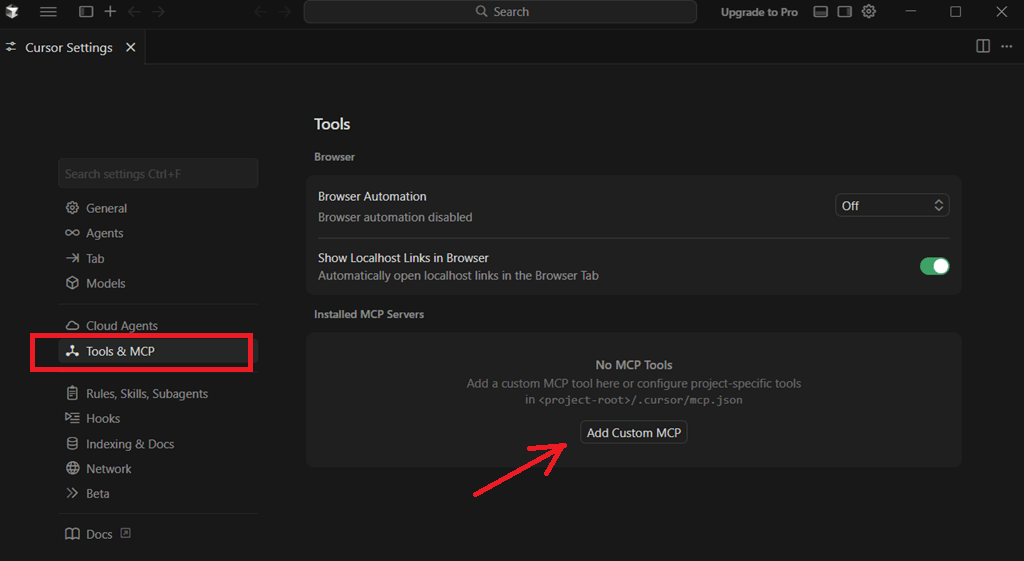
- Open Cursor Settings (or shortcut CTRL+SHIFT+J)
- Go to "Tools & MCP" -> "Add Custom MCP"
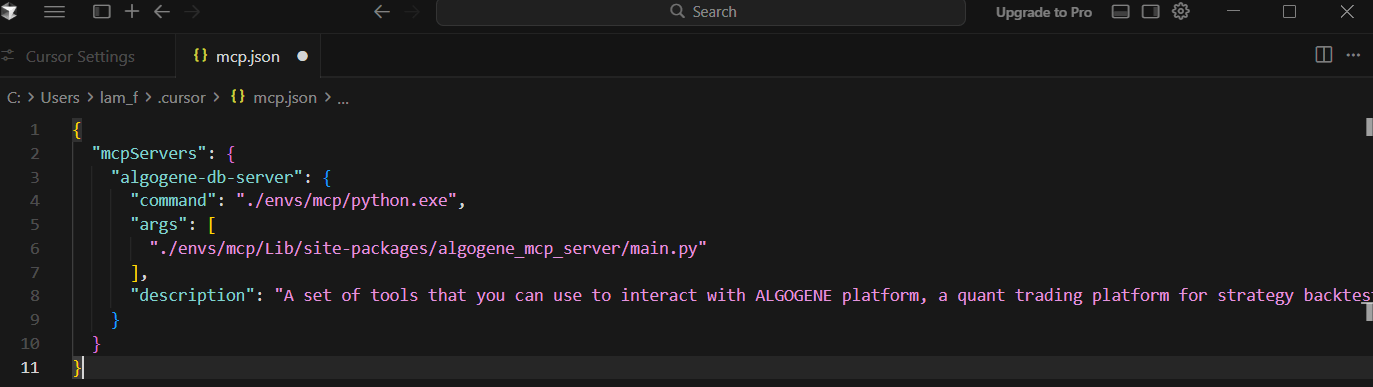
- Add "algogene-db-server" to "mcp.json" on Cursor as below. Remind to update "command" and "args" to your python installation path
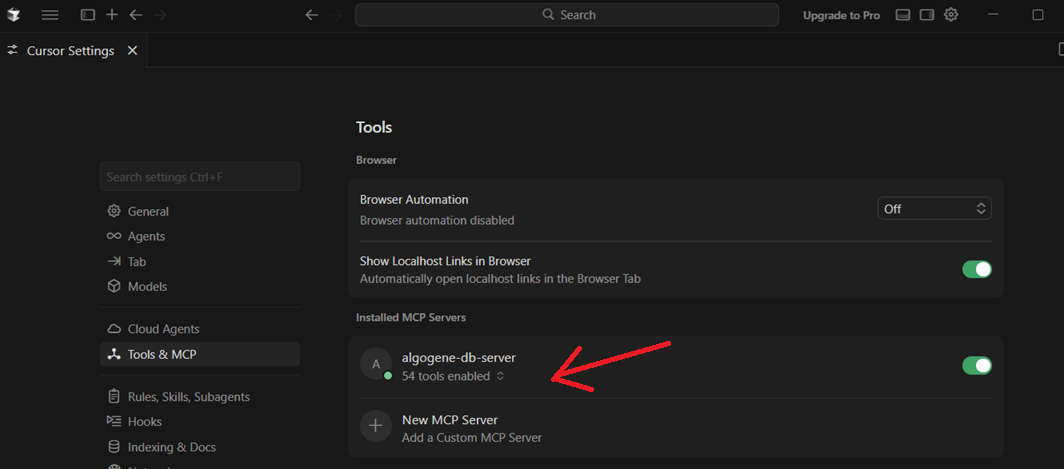
- Save and close "mcp.json". After successful connection, our MCP server is online with 54 tools available.
{
  "mcpServers": {
    "algogene-db-server": {
      "command": "./envs/mcp/python.exe",
      "args": [
        "./envs/mcp/Lib/site-packages/algogene_mcp_server/main.py"
      ],
      "description": "A set of tools that you can use to interact with ALGOGENE platform, a quant trading platform for strategy backtest, real-time data analytics and trading with 30+ brokers."
    }
  }
}
4.2. Chat with MCP server
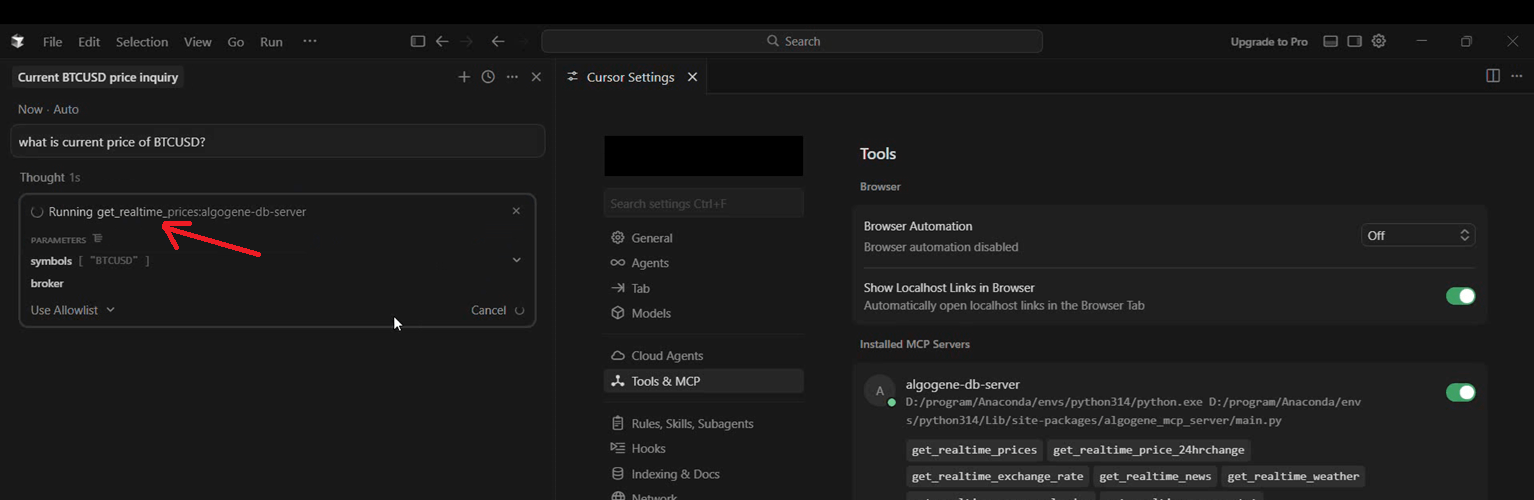
Use shortcut "CTRL+L" to start a new chat on Cursor.
For example, we try "what is current price of BTCUSD?", Cursor will identity related tool from our MCP Server to call function.
Available Tools
1. Contract Specification:
- get_instruments: Get all available instruments available on ALGOGENE
- get_instrument_meta: Get contract specification of a financial instrument
- search_instrument: Search related financial instruments based on matched keywords of symbol or description
- list_econs_series: List out all available economic time series
- search_econs_series: Search related economic time series based on matched keywords of titles, geo and freq
- get_econs_series_meta: Get meta data or specification of an economic time series
2. Real-time Data:
- get_realtime_prices: Get current price for trading symbol(s)
- get_realtime_price_24hrchange: Get the recent 24 hours market price change
- get_realtime_exchange_rate: Get current exchange rate between 2 currencies
- get_realtime_news: Get latest news for a specified language/source/categroy
- get_realtime_weather: Get latest weather info for a specified region
- get_realtime_econs_calendar: Get the upcoming economic calendar info such as holiday, statistics release, president speech, etc
- get_realtime_econs_stat: Get the most recent released economic statistics
3. Historical Data:
- get_history_price: Get historical market price
- get_history_news: Get historical news
- get_history_weather: Get historical weather
- get_history_corp_announcement: Get company's corporate announcement history
- get_history_econs_calendar: Get economic calendar history, such as holiday, statistics release, president speech, etc
- get_history_econs_stat: Get historical released economic statistics
- strategy_market_perf: Get performance statistics for a market index
4. Trading Account Current Status:
- get_session: Get session token that will be used to access account and order related resources
- list_accounts: List out all your trading accounts with latest balance on ALGOGENE.
- get_positions: Get outstanding positions of a trading account
- get_balance: Get current balance of a trading account
- get_opened_trades: Get opened trades of a trading account
- get_pending_trades: Get pending trades (or limit orders) of a trading account
- set_account_config: Trading connection setup with your personal broker/exchange account on ALGOGENE.
5. Trading Account History:
- strategy_trade: Get transaction history of a trading account
- strategy_bal: Get daily history of account balance of a trading account
- strategy_pos: Get daily history of position of a trading account
- strategy_pl: Get daily history of cumulative profit/loss of a trading account
- strategy_cashflow: Get history of cash flow (eg. deposit, withdrawal, dividend payment, etc) of a trading account
- strategy_stats: Get performance statistics history and trading setting of a trading account
- strategy_logs: Get system logs for running backtest or live strategy
6. Order Placecment and Management:
- open_order: Place an order on a trading account
- query_order: Query an order's details of a trading account
- update_pending_order: Update trading parameters of a pending order
- update_opened_order: Update trading parameters of an outstanding/opened order
- cancel_orders: cancel a list of unfilled limit/stop orders
- close_orders: close a list of outstanding orders
7. Strategy Development
- backtest_run: Submit a strategy script to run on ALGOGENE cloud platform
- backtest_cancel: Cancel a running backtest task
- get_task_status: Query the current status of a task on ALGOGENE (eg. backtest)
8. Other Trading Apps available on Algo Marketplace:
- app_predict_sentiment: Give a sentiment score for a given text (eg. news, blog posts, financial reports)
- app_asset_allocation: Calculate an optimal portfolio based on given risk tolerance level.
- app_portfolio_optimizer: Calculate an optimal portfolio based on dynamic objectives and conditions, such as target return, risk tolerance, group constraints, etc
- app_portfolio_optimizer_custom: Similar to 'app_portfolio_optimizer' to calculate an optimal portfolio based on given time series data
- app_fourier_prediction: Estimate the future range (i.e. upper and lower bound) of a financial instrument based on Fourier analysis and transformation.
- app_market_classifer: Calculate the bull-bear line and classify the market condition of a given financial instrument
- app_us_company_filing_hitory: Get the filing history's report URL from US SEC for a given ticker
- app_us_company_financials: Get company financial data for a given US stock
- app_stock_tagger: Identify related stocks for a given news
- app_index_composite: Get the index constituent data including the composited stocks, current weighting and sensitivity
- app_pattern_recoginer: Identify key technical pattern for a given financial instrument and time frame
- app_risk_analysis: Analyze potential market risk for a given portfolio holding
- app_trading_pair_aligner: Identify the most suitable instrument within the same asset class that can form a trading pair based on a given instrument
- app_price_simulator: Generate a financial time series based on correlation of another given time series
- app_capitalflow_hkex_szse: Get capital flow historical data between Hong Kong Stock Exchange (HKEx) and Shenzhen Stock Exchange (SZSE)
- app_capitalflow_hkex_sse: Get capital flow historical data between Hong Kong Stock Exchange (HKEx) and Shanghai Stock Exchange (SSE)
- app_performance_calculator: Calculate investment performance statistics based on given NAV time series
- app_algo_generator: Generate a backtest script of trading algorithm according to user's trading ideas or description
What You Can Build with the ALGOGENE MCP Server
The ALGOGENE MCP Server is limited only by your imagination. Here are just a few use cases for quants, developers, and trading teams:
- Algorithmic Trading Strategies: Build and deploy fully automated trading bots that use real-time data and portfolio optimization.
- Real-Time Financial Dashboards: Create custom dashboards for market monitoring, portfolio tracking, and risk analysis.
- Backtesting Pipelines: Combine historical data (get_history_price) with strategy performance stats (strategy_stats) to backtest and refine trading models.
- Institutional Trading Tools: Build white-label trading platforms for your team/ clients with ALGOGENE’s MCP-powered functionality.
- AI-Driven Quant Trading: Integrate LLMs (eg. Cursor, Claude) with ALGOGENE’s MCP functions to build AI-powered sentiment analysis and strategy generation tools.
Demo Video
Join the ALGOGENE MCP Ecosystem
The launch of the ALGOGENE MCP Server on PyPI is just the beginning. We’re building a community of quant traders, developers, and financial innovators who use MCP to reimagine what’s possible in quant trading.
Happy trading—with the ALGOGENE MCP Server.
