

Smart Money Insights Walkthrough: Track Hedge Fund Holdings, Congress & Insiders Own Trades
How it work
Every quarter, hedge funds managing $100M+ must file 13F holdings with the SEC. Members of Congress disclose trades under the STOCK Act. Executives report insider buys and sells. That data is public — and usually buried in EDGAR PDFs.
Smart Money Insights on ALGOGENE turns those filings into one research workflow: who owns what, who just traded, how books compare to SPY, and whether you can act on it in Portfolio Optimizer.
What is Smart Money Insights?
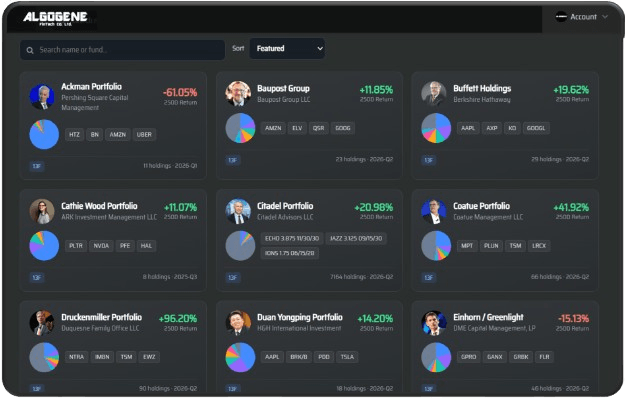
A Market Analysis hub that unifies three smart-money data sources:
- 13F funds — super-investor books (Buffett, Ackman, Baupost, Citadel, Coatue, ARK, Greenlight, and more)
- Congress — US STOCK Act disclosures
- Executive — insider / executive trade prints
Browse profiles for free. Unlock full holdings history, follows, ticker reverse lookup, digests, and Optimizer export as you upgrade (Pulse / Pro / Desk).
Why it helps
- One dashboard instead of hunting EDGAR, STOCK Act portals, and Form 4s separately
- Return vs SPY so you see alpha — not just famous names
- Clustered activity — tickers multiple funds or officials touched in the same window
- Ticker reverse lookup — answer “who owns this stock?” in seconds
- Alerts — follow names and get Web / email / Telegram digests when new filings drop
- One-click Optimizer — send a book into Portfolio Optimizer to backtest and blend before you trade
How to use it (5-minute guide)
- Open the hub — go to Services → Smart Money, then launch Smart Money Insights from Market Analysis.
- Filter by source — use tabs All / 13F Funds / Congress / Executive. Sort by featured, most active, or best ~250D return.
- Open a profile — review top holdings, sector mix, activity / disclosures, and cumulative return vs SPY since disclosure.
- Reverse-lookup a ticker — switch mode to Ticker, enter e.g.
NVDA, and see 13F holders plus Congress / Executive prints on that name. - Follow & get digests — Follow Pulse names; connect Telegram in Settings if you want VIP / Telegram alerts. Check “This week” for people and ticker clusters.
- Act in Optimizer — click Open in Optimizer on a book to stress-test weights and blend with your own strategy.
| Goal | What to click |
|---|---|
| See Buffett / Ackman / ARK books | Tab 13F Funds → open a card |
| Track politicians’ trades | Tab Congress → open disclosures |
| Ask “who owns NVDA?” | Mode Ticker → search ticker |
| Copy / study a portfolio | Profile → Open in Optimizer |
| Don’t miss new filings | Follow + Telegram / email digest |
Quick tip
13Fs land ~45 days after quarter-end — useful for positioning and clusters, not for day-trading the print. Use reverse lookup and SPY comparison to separate signal from celebrity.
Ready to try it? Open Smart Money Insights, reverse-lookup the first ticker on your watchlist, and tell us in the comments which super-investor book surprised you.
Frequently Asked Questions (FAQ)
What is a 13F filing?
A quarterly SEC report of US equity holdings for institutional managers over $100M. Smart Money Insights turns those filings into searchable portfolios and activity feeds.
Is tracking congressional stock trades legal?
Yes. STOCK Act disclosures are public records. ALGOGENE aggregates and displays them for research — it does not encourage illegal trading.
What is ticker reverse lookup?
Enter a stock symbol to see which tracked 13F funds, Congress members, and executives hold or recently traded it — including sizing and recent changes where available.
Can I copy a hedge fund portfolio?
You can send a tracked book into Portfolio Optimizer to backtest and adjust weights. Disclosures lag reality; always validate before investing.
Do I need a paid plan?
Registration includes the free hub to browse profiles. Pulse unlocks full holdings / history and follows; Pro adds ticker reverse lookup and deeper research tools. See plan details on Services.